
A photo sent over WhatsApp rarely works as site progress photos proof in a billing dispute. It arrives compressed, usually without a visible date or place, and nobody can check it. Use a stamped photo if you only need a record for yourself. Use a report your client can verify if money depends on the photos. This post is for contractors and site managers, and covers how chat photos get questioned, three methods compared, and what to send instead.
What happens to a photo on its way through a chat app
A chat app is built to move pictures quickly, not to preserve evidence. WhatsApp says on its own help page that media is usually compressed when shared, so quality may be lower than the original. It also offers an HD option, which is clearer but still not the original file.
Most people who work with site photos have also seen the other effect. A photo that showed its location on your phone often shows no place or time once it comes through a chat. We are not quoting a figure for this, because it depends on the app, the settings and how the photo was sent.
The result is simple. By the time your client or the PMC (project management consultant) opens the photo, they see only a picture. The date, the place and the camera are gone, or they are your word.
This is not a fault of WhatsApp. It was never meant to be a record.
Five ways a chat photo gets challenged
A reviewer who doubts a bill looks for a reason to ask. These are the common ones.
- "When was this taken?": the chat shows when it was sent, not when it was shot. A photo from last month can be sent today.
- "Is this our site?": with no location on the image, one stretch of road or one roof looks like another.
- "Is this the original?": a forward, a screenshot or an edited image cannot be told from a first-hand photo.
- "Whose phone clock is this?": a phone's date can be changed in settings, so a typed or phone-set date proves little.
- "Which RA bill is this for?": the running account (RA) bill covers a stretch of work. Photos scattered across chats and groups are hard to match to it.
Compression adds a separate problem. A compressed photo may not show the rebar spacing, the cable tag or the measurement in the frame.
None of these means you did anything wrong. They are questions a photo with no checkable detail cannot answer.
Compared: chat photo, stamped photo, a report the client can check
No single method settles every dispute. Here is what each one does.
Chat photo
What it stops: nothing. It is quick and free.
What it misses: date, place, originality and context. Anyone can send an old or borrowed photo.
What you need: a phone and a chat group.
Stamped photo
What it stops: the "where and when" question, if the stamp is added at the moment of capture and not typed in later.
What it misses: a loose stamped photo still travels by chat and can be edited or re-shared. The reviewer cannot confirm that the file is the one taken on site.
What you need: a camera app that stamps date, time and GPS.
A report the client can check
What it stops: most of the five questions above, because the photos are taken live, stamped, grouped by job, and can be verified.
What it misses: it does not prove the quality of the work, and a department or client still decides whether it accepts it.
What you need: an app that captures live and builds the report, such as a GPS camera photo report.
| Chat photo | Stamped photo | Checkable report | |
|---|---|---|---|
| Date and place on image | Usually not | Yes, if burned in | Yes, burned in at capture |
| Original file | Cannot tell | Cannot tell | Fingerprint on record |
| Who can check | Nobody | Nobody | Anyone with the link or QR |
| Matched to a job | By memory | By memory | One numbered job record |
When another tool or way fits better
Verafii is not always the answer. Pick by the dispute you expect.
- One person, no client to convince: a simple stamp camera app is enough for your own record. You do not need a report.
- Quantities in dispute: photos do not replace a joint measurement. Record it in the measurement book and have it signed by the engineer.
- Payment held for a drawing or test certificate: send the document. A photo cannot stand in for a test report.
- Original files for a lab or insurer: if a photo already exists and you must share it, send the original file, not a compressed copy, and say how it was taken.
Where a client only wants a quick view of progress, a chat photo is fine. Keep the effort for the bills that carry risk.
What to send your client instead
Send the client something they can check without calling you. For a progress claim, that is a short package.
- A report for the period: photos grouped by site and work item, each with its date, time and place.
- Wide and close frames: a wide shot to show the location, a close shot to show the detail, for each stage.
- A reference in the frame: a tape, a board with the item name, or a fixed landmark, so the same spot can be matched next time.
- A line that ties it to the bill: the RA bill number and the item in the BOQ (bill of quantities).
- A way to check: the QR or link, so the client's engineer can verify the report themselves.
Send it before the bill is questioned, not after. A report built by hand days later is harder to trust than one made before you leave the site.
How to do it with Verafii
Verafii is a camera and report app. It captures live, so there is no gallery and no file picker. Here is the routine on site.
- Open Verafii on your phone, on Android or iPhone. The features are the same on both.
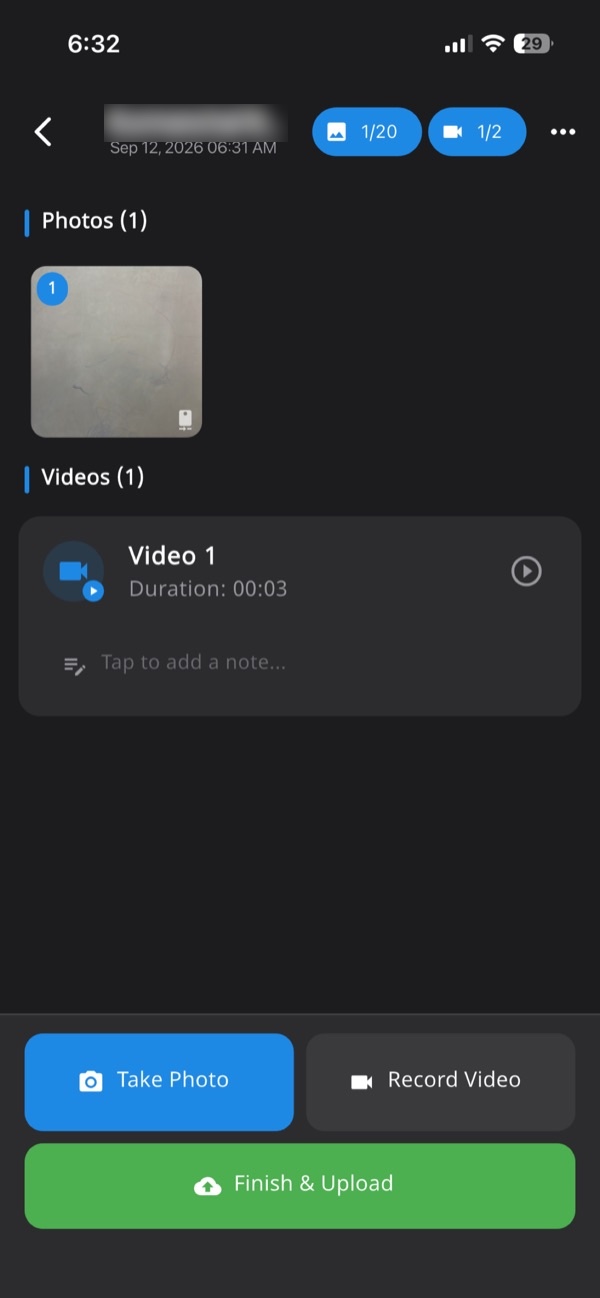
- Start the job for the site. Every photo, video and note you take lands in one numbered session tied to that site.
- Take the photos with Verafii's own camera. GPS and time are burned into each image at the shutter.
- Add a short note for the item, such as the RA bill number and the work stage. If there is no signal, carry on. Capture works offline and uploads when the phone is back online.
- Record a short video where it helps, for example a walk along a cable route. Live video with audio is supported.
- Before leaving site, make the PDF report in one tap. It carries your customer logo, location, device, time and a QR code.
- Send the PDF to the client by WhatsApp or email, as you would any file.
The client scans the QR, or opens the page to check a Verafii report, with no account and no app. Dropping in the file they received fingerprints it in their browser, and nothing is uploaded. A match means the file is untouched.
If someone used a fake location, Verafii flags it on the photo, the report, the verify page and the dashboard. It flags it; it does not stop the person from trying. For more on site reports, see the construction site photo report and the site inspection app pages. For a worked example of geo-tagged proof, read our post on PM Surya Ghar geo tagged photo proof for defect fixes.
Set it up in a week
- Pick one live job: start with a site where bills are slow or questioned, not every site at once.
- Agree the frames: decide, with the site engineer, the wide and close shots for each stage.
- Train the crew in ten minutes: show them live capture, the note line and how to make the report.
- Make a report at the end of each day or visit: before leaving the site, so nothing waits.
- Show the client the check: scan the QR with their engineer once, so they know how to verify.
- Review after the first bill: see which questions still came back, and add a frame or note for them.
What a report can't prove
A checkable report shows where and when photos were taken, and that the file is unchanged. It does not show more than that.
- Quality of work: a photo shows what the camera saw. It does not show concrete strength or a hidden joint.
- Quantity: it does not replace a joint measurement.
- What is outside the frame: a photo can be framed to leave something out. Wide shots and a reference in the frame help.
- Indoor and tall-building GPS: GPS drifts indoors, in basements and between tall buildings. A slightly off location is not proof of wrongdoing, so ask your crew before you accuse.
- Acceptance: whether a department, insurer, court or client accepts a report is their decision.
Verafii also does not upload to any government portal and does not replace an official app. If a scheme needs its own app, use that, and keep the report as supporting detail.
Keep WhatsApp for talking, not for proof
WhatsApp is the right place to ask a question, share a quick look and sort out a delay. Keep using it for that.
For the photos that support a bill, use a record that carries its own date, place and check. Then the chat can point to the report instead of being the evidence. When the client's team asks "when and where was this?", the answer is a scan away.
If you want to try this on a live job, Verafii has a 30-day free trial.
Frequently asked questions
Are WhatsApp photos valid proof of site progress?
They can show the work looked a certain way, but they are weak evidence on their own. WhatsApp says media is usually compressed when shared, and a forwarded photo carries little a reviewer can check. Whether a client or authority accepts it is their decision.
Does WhatsApp remove the location from photos?
In common experience, a photo sent as a normal chat photo often no longer shows its location or camera details on the receiving phone. This depends on the app, settings and how it is sent, so do not count on it either way. A stamp burned into the image at capture does not depend on hidden file data.
What should I send instead of photos in a billing dispute?
Send a report where each photo carries its date, time and place, grouped under one job and tied to the RA bill and work item. Add wide and close frames, and a way for the client to check the report. Joint measurements and certificates should still be sent separately.
How can a client check a Verafii report?
The client scans the QR on the report, which opens a public verification page with no account and no app. They can also drop in the file they received. It is fingerprinted in their browser, nothing is uploaded, and a match means the file is untouched.
Can Verafii photos be faked with a fake GPS app?
A fake location can be tried, but Verafii flags it on Android and iPhone, on the photo, the report, the verify page and the dashboard. Flagged is not the same as blocked, so the reviewer still has to look at the flag. Poor GPS indoors is a separate matter.
Will Verafii make sure my photos are accepted?
No. Whether a client, PMC, department or insurer accepts a photo is their decision. Verafii gives them live-captured photos with GPS and time burned in, a report, and a check anyone can run.
Is a simple timestamp camera app enough?
For your own record, often yes. A stamp helps with where and when. It does not show that the file is the original, and there is usually no way for the client to check it themselves.
Try it on one live job
Start the 30-day free trial, with a call at the end to decide whether to continue. You can also ask Verafii for a quote from the home page. The price depends on your team: how many field agents, how many admin users, how long you keep evidence and the photo and video quality.
