
After a third-party quality inspection flags a defect, empanelled PM Surya Ghar vendors must fix it and upload proof within 15 days. As reported by the trade press, the photos must be geo-tagged and time-stamped, with remarks for each defect and a consumer-countersigned undertaking. This post is for rooftop solar vendors and their site crews. It covers the rule as reported, what a good pm surya ghar geo tagged photo shows, why phone photos get questioned, and how to keep proof across many rooftops.
What to know now (November 2026)
Four actions, based on the reports linked in the next section. Confirm each against the portal's own notice.
- Open your vendor login today: list every defect in the FQI defect section, with the date it appeared.
- Fix first, photograph after: proof of a repair that has not happened will not help you.
- Capture live at the roof: geo-tagged, time-stamped photos, taken on a date inside your 15 days.
- Plan the consumer's signature: the undertaking needs the consumer, so book the visit early.
What changed for PM Surya Ghar vendors
Under PM Surya Ghar: Muft Bijli Yojana, installed rooftop systems can be picked for third-party quality inspection. When an inspector finds a defect, it appears in the FQI defect section of the vendor's login on the National Portal. FQI refers to this quality inspection module.
On 6 October 2026 the trade press reported new guidelines for sending proof of the fix. Energetica India reported that vendors get 15 days to rectify and upload corrective evidence. SolarQuarter and Construction World carried the same points.
A note on sources. We could not open the National Portal's own notice, so everything below is as reported by these papers. Read the notice and the user manual in your vendor login before you act. The portal lists a "User Manual for FQI Defect Module in Vendor Login" under its Knowledge Centre, as reported by Energetica India.
The rule, point by point
These points are as reported by the papers linked above. None of them is quoted from the official notice.
- 15 days to respond: vendors have 15 days to rectify and submit proof after the defect is assigned. The reports do not say exactly when the count starts, so check the date shown against each defect in your login.
- Geo-tagged and time-stamped photos: photographs uploaded as proof of the fix must carry both. Supporting documents do not need these, as reported by Construction World.
- Status and remarks per defect: for each defect you tick the relevant rectification status, enter remarks and upload proof.
- Undertaking with the consumer's signature: you choose the update-and-download-undertaking option, print the declaration on your letterhead, sign and stamp it, add the consumer's details and get the consumer's signature confirming the fix. Then you upload it.
- Inverter app photo, where there is no display: if an inverter model does not show cumulative generation on its screen, the reports say a geo-tagged photo from the inverter's mobile app is allowed. It must show cumulative generation and the inverter serial number.
The papers do not describe what happens if you miss the 15 days. Do not assume. Ask your DISCOM (the state power distribution company) or portal helpdesk.
What a good rectification photo shows
The reviewer sees only the picture. So the picture has to answer three questions: which rooftop, which defect, and is it fixed now.
- Wide shot: the whole array or the part of the roof involved, so the reviewer can place the fix.
- The defect point, after the fix: the exact item the inspector named. For example, the earthing connection, the cable routing, the mounting clamp or the module label.
- Serial numbers: the inverter or module plate, readable, when the defect concerns them.
- Inverter display or app screen: cumulative generation with the serial number, where the defect or the rule calls for it.
- Location and time stamp: visible on the image, taken at the roof on a date inside your 15 days.
- Remark match: the photo number should match the remark you type for that defect.
If the inspector's photo showed the defect, retake the same angle after the fix. A before-and-after pair is easy to judge. See our guide to a solar installation photo report for a fuller shot list.
Why ordinary phone photos get questioned
A reviewer in another city cannot stand on the roof. They look for reasons to doubt the file, and ordinary phone photos give several.
- Chat apps strip location: WhatsApp and similar apps usually compress the picture and may drop embedded location. A photo that went through chat may reach you with no geo-tag.
- The phone clock can be changed: a wrong date on the phone gives a wrong time stamp, by mistake or on purpose.
- Gallery photos are not live: an old photo from another roof can be uploaded as new proof.
- Typed or edited stamps: a date typed into an image proves nothing by itself.
- GPS drifts: under cloud, near tall buildings or in a dense lane, the location can be off by many metres. A small mismatch is a reason to ask, not to accuse.
What is unclear. The reports say "geo-tagged and time-stamped" but not whether the portal reads the location embedded in the file or the stamp printed on the picture. Check the user manual or ask the helpdesk. Whether a photo is accepted is the portal's decision.
Capturing rectification proof with Verafii, step by step
Verafii is a live-capture camera and report app. It does not upload to the National Portal and does not replace any official app. You still upload on the portal yourself. Verafii gives you photos with GPS and time burned in, and a report to keep.
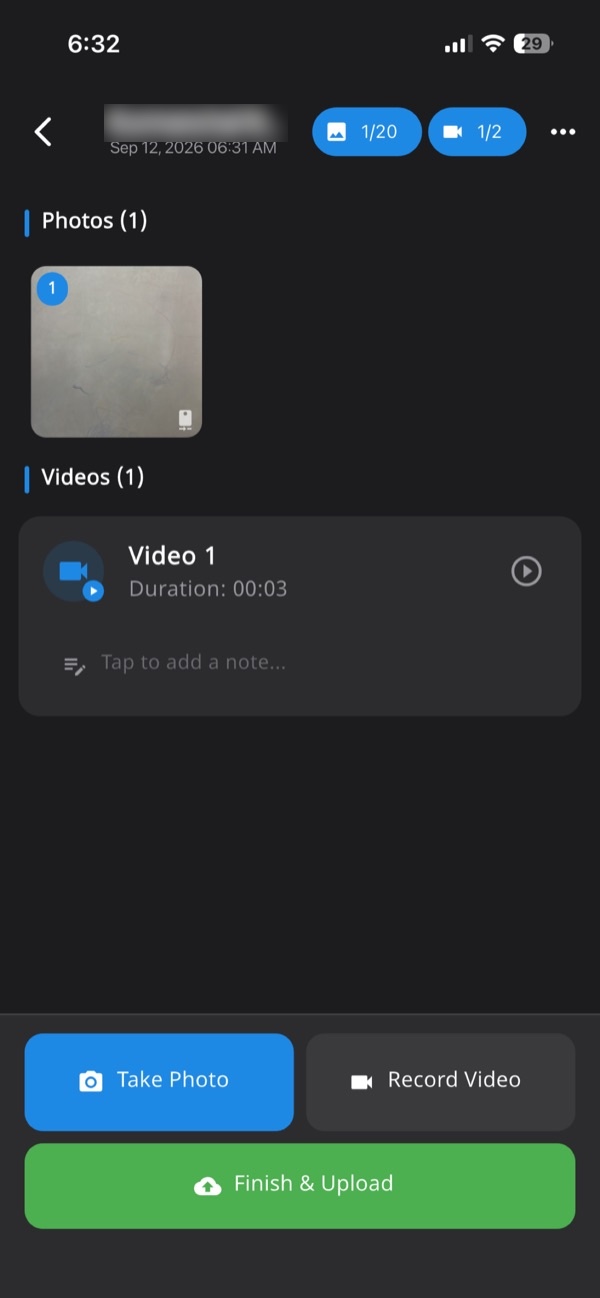
- Open the Verafii job for the rooftop, so every photo lands in one numbered record tied to that site.
- Stand at the defect point and capture the wide shot from Verafii's own camera. There is no gallery or file picker, so the photo is live.
- Capture the close-up of the fixed item, then the serial number plate or inverter screen if the defect needs them.
- Add a short note for each defect, matching the remark you will type in the portal.
- If there is no signal on the roof, keep going. Verafii works offline and uploads when the phone is back online.
- Before leaving, make the one-tap PDF report. It carries your logo, location, device, time and a QR code.
- Then upload to the portal yourself, where its own checks apply.
Anyone can then check a Verafii report: scan the QR, or drop the file in the public page to compare its fingerprint. A fake GPS location is flagged on the photo and the report, on Android and iPhone. Read more on the GPS camera photo report page.
Keeping proof across many rooftops
A vendor with dozens of open defects across districts needs a system, not a folder of photos.
- One job per rooftop: name it with the consumer's application number so photos and notes stay together.
- One owner per defect: each crew lead knows which defects and which dates are theirs.
- A deadline list: write the 15-day date beside each defect when it appears in your login. Work the nearest date first.
- Review at the office: the manager checks numbered photos on the web dashboard before anyone uploads on the portal.
- Same standard everywhere: one shot list for every crew, so photos look alike.
Teams that need attendance or live tracking between clock-in and clock-out can ask for those add-ons. They are available on request and charged on top of the plan. See also our site inspection app page.
What this record can't do
A time-stamped photo shows that a place and a moment were captured. It does not show that the work is correct.
- It cannot decide acceptance: the portal, the inspector, the DISCOM or the consumer decide that. Verafii does not claim any of them accept its photos.
- It cannot replace the undertaking: the consumer's signature and your signed, stamped letterhead are still needed, as reported.
- It cannot fix GPS drift: indoors or among tall buildings, the location may be off.
- It cannot prove quality: a clamp can look tight and still be wrong. The inspector judges the work.
- It cannot rescue a missed date: capture early, because retaking after the 15 days will not help.
Be fair to your crew. If a location looks off, ask them before you assume anything.
Checklist before the deadline
- Read the official notice and manual: confirm each rule in your vendor login.
- List every open defect: note its consumer, inspector remark and 15-day date.
- Visit and fix first: proof comes after the repair, not instead of it.
- Photograph live at the roof: wide shot, close-up and serial number.
- Check time and place: each stamp matches the site and a date inside the window.
- Write one remark per defect: tie it to the photo numbers.
- Print the undertaking on letterhead: sign, stamp and add the consumer's details.
- Get the consumer's signature: on the same visit, if you can.
- Upload early on the portal: leave time for errors.
- Keep a copy: store the photos and the signed undertaking.
Frequently asked questions
How many days do vendors get to fix PM Surya Ghar defects?
As reported by Energetica India, vendors have 15 days to rectify and upload proof. The reports do not say exactly when the count starts. Check the date in your vendor login and the National Portal's own notice.
Do PM Surya Ghar rectification photos need to be geo-tagged?
Yes, as reported by Construction World, photos must be geo-tagged and time-stamped. Supporting documents do not need these. Confirm the detail in the official user manual.
What is the consumer undertaking for defect rectification?
It is a declaration generated on the portal. As reported, you print it on your letterhead, sign and stamp it, add the consumer's details and get the consumer's signature confirming the fix. Then you upload it to the portal.
What if the inverter does not show cumulative generation?
The reports say you can upload a geo-tagged photo from the inverter's mobile app. It should show cumulative generation and the inverter serial number. Check the official manual for the exact wording.
Does Verafii upload photos to the PM Surya Ghar portal?
No. Verafii does not upload to any government portal. You upload to the National Portal yourself. Verafii gives you live photos with GPS and time burned in, and a PDF report with a QR that anyone can check.
Will Verafii make sure my photos are accepted?
No. Whether the portal, inspector or DISCOM accepts a photo is their decision. Verafii's report shows where, when and on which device each photo was taken, and flags a fake GPS location.
Do WhatsApp photos keep their location?
Often not. Chat apps usually compress images and may drop embedded location. For proof that must show a place and time, capture live in an app that burns them into the image.
Try Verafii on your next rectification visit
Start the 30-day free trial and capture your next rooftop fix live, with GPS and time on every photo. The price depends on your team: field agents, admin users, how long evidence is kept, and photo and video quality. See Verafii for more.
This article is general information, not legal advice.
