
The slab was cast. The trench was backfilled. Then the engineer's note on your running bill said "quantity not verified", because the work was covered before anyone measured it.
Weeks later, nobody could show what lay underneath. The bill sat on hold.
Running bill photo proof is a dated, located record of each bill item at four moments, kept beside the measurement. This post is for contractors and subcontractors in India. It gives a routine, a bill packet and a way to send proof the client's engineer can check.
Why running bills get held
A running account (RA) bill claims payment for work done since the last bill. The quantities should rest on measurements, which Indian public works recorded in a measurement book (MB). The CPWD Works Manual 2022, hosted by NDMC, is the usual reference for that practice. Your contract may set its own rules, so read it.
A bill is usually held for one of these reasons:
- Work covered early: rebar, pipes, earthing and waterproofing vanish before the engineer measures them.
- Measurement without a picture: the MB has a number, but nobody can see what it describes.
- Photos with no date or place: a phone photo can be from another site or another month.
- Late questions: a PMC (project management consultant) asks months later, when the crew has moved on.
- Evidence scattered: proof sits in chat groups, personal phones and memory.
Each hold costs you time and working capital. A photo record does not decide the bill. It lets you answer "was this work really done?" with something the reviewer can look at. The site progress photo post explains why chat forwards fall short.
With proof and without
The same query, handled two ways:
| Without a photo record | With a photo record | |
|---|---|---|
| Query arrives | You search phones and chat groups | You open the item's session |
| Date and place | Typed in, or unknown | Burned into each photo at capture |
| Hidden work | Your word against the engineer's | Photos from before it was covered |
| Reply | Days of back and forth | A report sent the same day |
The record does not guarantee the engineer agrees. It narrows the argument to the measurement, which is where it belongs.
The four-moment photo habit for each bill item
Pick every item you will bill: a slab, a cable run, a pit, a wall. Photograph it at four moments. Each takes under a minute.
Moment 1: Before
Frame the area as it stands before you start. Include a fixed landmark, such as a column, a gate or a signboard. This shows the starting condition and the location.
Moment 2: During
Capture the work in progress, especially anything that will be hidden. For rebar, show spacing with a tape in frame. For a pipe trench, show depth and bedding. A short live video with audio can walk along a long run while you say the chainage aloud.
Moment 3: Hidden or finished
Take this photo just before covering, or when the item is complete. It is the one that answers the held-bill question. Take one wide shot, then close shots of the details the specification names.
Moment 4: Measured
When the engineer measures, photograph the measuring in action: the tape, the person, the item. Add the measurement-sheet number in a note. Now the photo and the MB entry point at each other.
Two cautions. Do not stage a photo of work that is not done yet. And do not skip moment 3 because moment 4 "will do"; the engineer may measure after the work is covered.
What to say or write on site
Give the foreman one line: "No item gets covered until its hidden-work photos are in the record."
Then a short note on each photo set, in plain words:
- "Item 4.2, plinth beam, rebar before concreting, Gridline C to D."
- "Item 7.1, cable trench, 0.9 m depth, chainage 120 to 160."
- "Item 4.2 measured with Mr Rao, sheet 14."
A note should name the item number from the bill of quantities, the place and the stage. Anyone reading the report months later should need no one to explain it.
How to do it with Verafii
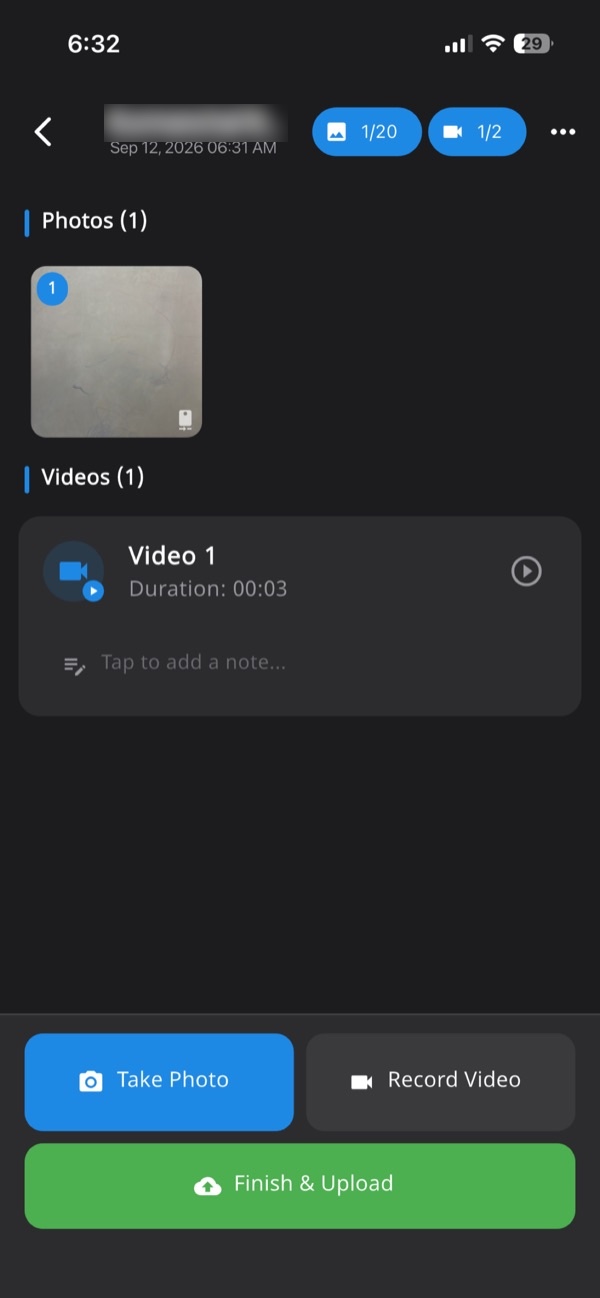
Verafii is a live-capture camera and report app. Photos and video come only from its own camera, with GPS and time burned into each image. There is no gallery import. The steps below use only what the app does.
- Open the app on site and start the job record for the bill item or work area. Every photo, video and note you add lands in one numbered session tied to the site.
- Take the "before" photos with the in-app camera. Date, time and place are stamped at the moment of the shutter.
- Capture the work in progress. Use live video with audio for long runs, and speak the item number and chainage.
- Add a short note to each set with the item number and stage.
- If there is no signal, carry on. The app captures offline and uploads when the phone is back online.
- Take the "hidden or finished" and "measured" photos the same way.
- Before leaving the site, make the one-tap PDF report. It carries your logo, location, device, time and a QR code.
- Check the result in the web dashboard, where managers can see sessions and export them.
Anyone can check the report by scanning its QR, or by dropping the file onto the verify page. Our guide to checking a Verafii report shows how.
If someone uses a fake location, Verafii flags it on the photo, the report and the dashboard, on Android and iPhone. A flag is a reason to ask, not proof of guilt.
What goes in the bill packet, and how to send it
A packet that answers questions before they are asked is easier to pass. Work to your contract's own list. A sensible packet holds:
- The RA bill: in the client's format, with item numbers matching the bill of quantities.
- Measurement sheets: signed or initialled, as the contract needs.
- The photo report: one PDF per item or area, in item order.
- Hidden-work photos: marked in the report, so the reviewer finds them at once.
- Notes: item number, place, stage, and the engineer measuring.
Field
The crew takes the four moments and writes the notes. The site engineer reviews the session before leaving. See the construction site photo report page for how a session becomes a report.
Office
The billing person pulls reports from the dashboard and matches each to a bill item. Missing a stage? Raise it that day, while the work is still visible.
Client
Send the PDF. The client's engineer can scan the QR to open the public verify page, no account or app needed. Dropping in the file they received fingerprints it in the browser, nothing uploaded. A match means the file is untouched. Whether the client relies on it is the client's decision.
Subcontractor to main contractor: the same proof up the chain
Your bill to the main contractor is often the first link in a chain. The main contractor's bill to the client, or to the EPC (engineering, procurement and construction) owner, repeats your quantities. If your proof is weak, theirs is too.
As a subcontractor:
- Send reports, not folders: the same PDF you made on site, unchanged.
- Match their item numbers: use the main contractor's bill of quantities in your notes.
- Send hidden-work photos early: before the main contractor covers the next layer.
As a main contractor:
- Ask for the report with each sub-bill: the QR lets your engineer check it without calling anyone.
- Pass the same reports up: you add no new claim, only your own cover note.
Larger teams can ask about add-ons, such as API access to list and download reports, or storage in their own cloud. These are available on request and cost extra.
What a photo record can't settle
Be clear about its limits.
- Quantity: a photo shows work exists. It does not replace measurement against the specification.
- Quality: a camera cannot test concrete strength or compaction. Lab and site tests do that.
- Rates and scope: disputes over rates, variations or extra items are contract questions.
- Indoor and tall-building GPS: location can drift. Ask before you accuse.
- Acceptance: the client, PMC or department decides what it accepts. Verafii does not submit anything to a government portal.
- Staging: a live photo can still be of the wrong thing. A careful reviewer reads the notes and the photos together.
The record makes the question easier to answer. It does not promise a payment date or an outcome.
Checklist for each running bill
- Items listed: every bill item has a session or a place in one.
- Before photos: taken with a landmark in frame.
- During photos: rebar, pipes and cables shown before cover.
- Hidden-work photos: taken before anything is covered.
- Measured photo: the engineer measuring, with the sheet number in a note.
- Notes: item number, place and stage on every set.
- Report made: the PDF was created before leaving the site.
- Packet ordered: reports follow bill item order.
- Subcontractor reports: collected unchanged with each sub-bill.
- Check run: you scanned your own QR once before sending.
To try this on your next bill, start the 30-day free trial. This post reflects Verafii's product as of 7 November 2026.
Frequently asked questions
What photos support a running bill?
Photograph each bill item before, during, when hidden or finished, and when measured. Add a note with the item number and place. Your contract and the client's engineer decide what is needed, so check the contract's list first.
Can photos replace the measurement book?
No. Quantities in a running bill rest on measurement, which the CPWD Works Manual 2022 treats as recorded in the MB. Photos show the work existed and what it looked like. They sit beside the measurement and do not replace it.
Why is my RA bill held for lack of proof?
Common reasons are work covered before measurement, photos without date or place, and records scattered across phones. A held bill is the client's decision, and the reason may be on their side. Ask for the query in writing, then answer it with item-wise photos.
How can a client's engineer check my photo report?
With a Verafii report, they scan the QR code to open a public verify page. No account or app is needed. They can also drop in the file they received, and a match means it is untouched.
Does Verafii work without mobile signal on site?
Yes. You can capture photos and video offline. They upload when the phone is back online. The date, time and GPS are stamped at capture.
Will Verafii make sure my running bill is paid?
No. Payment is the client's decision, and Verafii cannot promise speed or outcome. It gives you a dated, located, numbered record that makes the question easier to answer.
Can a subcontractor send the same proof to the main contractor?
Yes. Send the same PDF report you made on site, unchanged. The main contractor can verify it by QR and pass it up with their own bill.
Try it on your next running bill
Start the 30-day free trial and run the four-moment habit on one bill. The price depends on your team: field agents, admin users, how long evidence is kept, and photo and video quality. You can also ask for a quote from the home page of Verafii.
