
GPS Map Camera is a good choice if you only need location and time printed on a photo. Verafii is a better gps map camera alternative when a client, PMC (project management consultant) or claims team must be able to check the photo themselves. A stamp tells people where and when you say a photo was taken. A verifiable report lets them test it. This post is for site teams who already use a stamp app and are asked for more.
What GPS Map Camera does well
GPS Map Camera is a camera app that prints location details and the date and time on your photos. Its Google Play listing describes it as a geo-tagging camera. Several apps use similar names, so check that you are looking at the right one.
For many jobs that is all you need. The stamp is quick to read, and the app is easy to start using.
- Fast to start: install it, open the camera and shoot. There is little to set up.
- Readable stamp: anyone looking at the photo sees the place and time without opening a file.
- Good for personal records: a surveyor or supervisor can keep dated pictures for their own memory.
Features change between versions, and some are in paid tiers. Read the current listing before you decide.
What Verafii adds
Verafii starts from a different question: how will the person who was not on site check this photo? Everything else follows from that.
- Live capture only: photos and video come from Verafii's own camera. There is no gallery and no file picker, and the app never asks for photo-library access.
- Fake GPS flagged: on Android and iPhone, a photo taken with a fake location is flagged on the photo, the report, the verify page and the dashboard.
- One-tap PDF report: it carries your client's logo, location, device, time and a QR code. You make it before leaving the site.
- Anyone can verify: the QR opens a public page. No account and no app is needed.
- SHA-256 fingerprint: one fingerprint covers the PDF, every photo and every video. A reviewer can drop the file they received into the page, and a match means it is untouched.
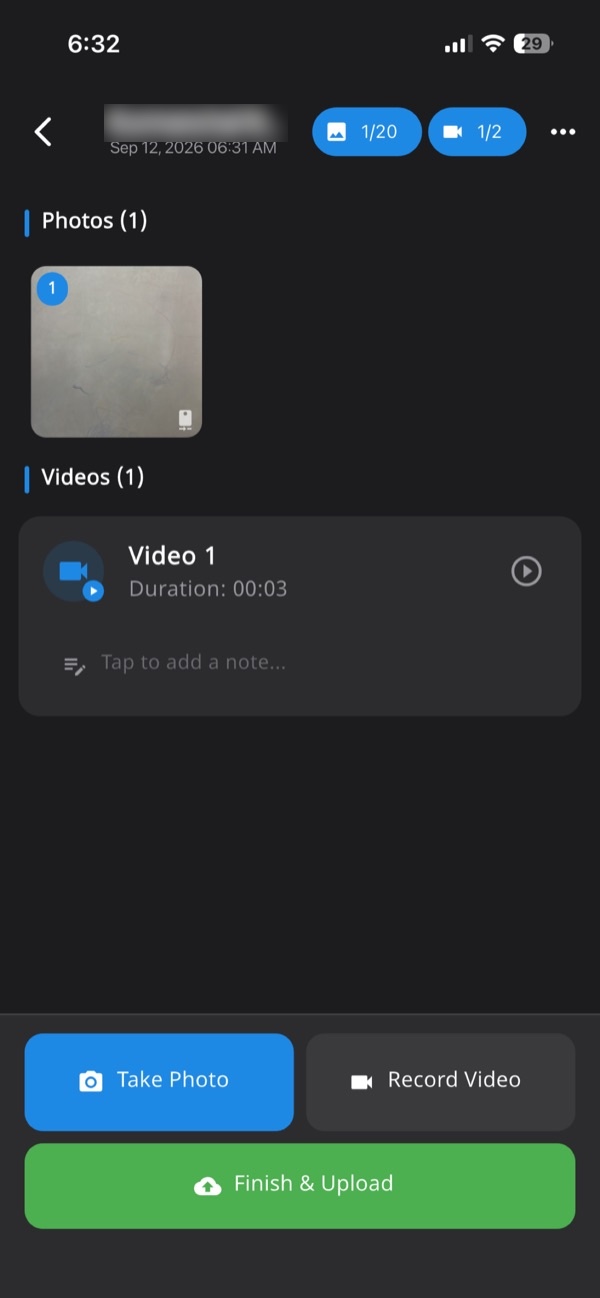
- Job record and dashboard: every photo, video and note lands in one numbered session tied to the site, and managers see it on the web dashboard.
It works on iOS and Android with the same features, and it captures offline.
Side by side
The left column describes a plain stamp camera in general, not a promise about any one app. Check GPS Map Camera's listing for what your version does.
| Typical stamp camera | Verafii | |
|---|---|---|
| Where the image comes from | Depends on the app; check | Live in-app camera only |
| Location and time | Printed on the photo | Burned in at the shutter |
| Fake GPS | Depends on the app; check | Flagged on Android and iPhone |
| Report | Depends on the app; check | One-tap PDF with QR, made on site |
| Who can check it | Whoever trusts the stamp | Anyone, from a public link |
| Tamper check | Visual only | SHA-256 fingerprint on record |
| Manager view | Photos in a folder or chat | Job record and web dashboard |
The row that matters most is "who can check it". A stamp asks the reviewer to trust you. A fingerprint and a public page let them test instead.
When GPS Map Camera is the better choice
Do not add process you do not need. A stamp app is the better choice in these cases:
- You work alone: you want dated pictures for your own file, and no one will audit them.
- The client is relaxed: they accept photos in a group chat and have never asked how they were taken.
- Quick, one-off use: you need a place and time on a few pictures today, with no team to manage.
- No dashboard needed: you do not need a manager to review, number or export a job record.
Our post on the best GPS camera apps for site photos in India compares more stamp apps if you want to look wider.
When Verafii fits
Verafii fits when someone else has to be convinced. That is common with running bill (RA bill) photos, solar or telecom handover, insurance claims and PMC reviews.
- A client questions your photos: they can scan the QR and see the location, time and any fake-GPS flag.
- A team captures, an office reviews: field people shoot, and admin users review and send from the dashboard.
- You are tired of building reports by hand: the PDF is one tap, before you leave.
- You need a clear record of a job: photos, video and notes sit in one numbered session.
See our routine for running bill photo proof, and why WhatsApp isn't enough for progress photos. You can also read about a GPS camera photo report.
How to do it with Verafii
- Open Verafii and start the job for the site. Every photo, video and note goes into this one session.
- Capture photos and video with Verafii's own camera. You cannot pick from the gallery.
- Keep shooting if the signal drops. Verafii captures offline and uploads when the phone is back online.
- Add notes to the session where a photo needs explaining.
- Before leaving the site, make the PDF report with one tap. It carries your client's logo, location, device, time and a QR code.
- Send the PDF to the client or PMC.
Anyone can then check a Verafii report by scanning the QR, or by dropping the file into the verify page. A match means the file is untouched.
What a stamp or a report can't prove
Neither a stamp nor a report is complete proof of the work. Be clear about the limits with your client.
- GPS drifts: indoors and near tall buildings a location can be off by some distance. Ask before you accuse a crew member.
- Fake GPS is flagged, not erased: a flag is a reason to ask questions, not a verdict.
- Quality is not shown: a photo shows what was in front of the camera, not whether the work meets specification.
- Staged shots: someone can still photograph the wrong thing at the right place. Framing and notes help.
- Acceptance is the reviewer's decision: a department, insurer, court or client decides whether to accept any photo. Verafii shows what the photos and report contain.
- No uploads to portals: Verafii does not upload to a government portal and does not replace an official app.
If fake location is your worry, read how to catch fake GPS fairly. Reports and photo watermarks are in English.
Frequently asked questions
What is a good GPS Map Camera alternative for client proof?
Choose an app whose photos a client can check without trusting you. Verafii captures live only, flags fake GPS, and makes a PDF with a QR that opens a public verify page. A plain stamp app may be enough if no one will question your photos.
Does a GPS stamp on a photo prove where it was taken?
Not by itself. A stamp is text on the picture, and the reviewer cannot test it. Live capture, a fake-GPS flag and a file fingerprint give a reviewer something to check. GPS can also drift indoors.
Can a client verify a Verafii report without the app?
Yes. The QR opens a public verification page, and no account or app is needed. Dropping in the file you received fingerprints it in the browser, with nothing uploaded. A match means it is untouched.
Does Verafii flag fake GPS?
Yes, on Android and iPhone. A photo taken with a fake location is flagged on the photo, the report, the verify page and the dashboard. It is a flag, so ask the person before drawing a conclusion.
Can I import gallery photos into Verafii?
No. Verafii has no gallery and no file picker, and it never asks for photo-library access. Every photo and video comes from its own live camera.
Will Verafii make sure my photos are accepted?
No. Whether a client, department or insurer accepts a photo is their decision. Verafii shows location, time, device and a verifiable fingerprint so the reviewer has something to check.
Does Verafii work on both iPhone and Android?
Yes. The app runs on iOS and Android with the same features. Managers use the web dashboard to review jobs and exports.
Try Verafii on one real job
Start the 30-day free trial, with a call at the end to decide whether to continue. Or ask for a quote. The price depends on your team: field agents, admin users, how long evidence is kept, and photo and video quality.

