
A geo tagged photo for government work is a site photo that carries its location, date and time, so a reviewer can see where and when it was taken. Each scheme says which photos it needs and which official app takes them. That official upload stays where the scheme requires it. This post is for contractors and site teams on public works. It covers what departments ask for, what a good photo shows, and how to keep your own record next to the official one, as of 7 November 2026.
Why do departments ask for geo-tagged photos?
A government engineer cannot visit every site at every stage. A photo with a location and a time is the next best thing. It shows that the work exists, where it is, and roughly when it was done.
The photo also supports payment. In some schemes, money is released only after a stage photo is uploaded. In others, the photo supports a later check by an officer, an auditor or a DISCOM (electricity distribution company) inspector.
For you as a contractor, the photo is evidence for your own bill. If a stage is questioned months later, the picture is often the only thing you can show.
What do public schemes actually ask for?
Schemes differ, so read each one's own guideline. Four well-known patterns are below. Where a detail is not linked, check the scheme document before you rely on it.
- PMAY-G (Pradhan Mantri Awaas Yojana – Gramin): the Ministry of Rural Development says that [instalments depend on a construction stage being completed and a geo-tagged, time and date stamped photo of it being uploaded on AwaasSoft through AwaasApp](https://www.pib.gov.in/PressReleseDetailm.aspx?PRID=2151276®=48&lang=2). Geo-tagging of the existing and proposed site comes before sanction.
- The Awaas App itself: its store page says it captures photographs with time stamp and geo-coordinates of the house at each construction stage. It is published by the Ministry of Rural Development, developed by NIC (National Informatics Centre).
- MGNREGA (Mahatma Gandhi National Rural Employment Guarantee Act): the scheme has geo-tagging rules for assets, and they have been changed over time, as this PIB release on geo-tagging rules shows. Read the current notice for the stages and the app.
- PM Surya Ghar: Muft Bijli Yojana: rooftop solar work goes through the national portal. The exact photo list and steps sit in the guidelines on that portal, so read them there. Our post on PM Surya Ghar geo tagged photo proof for defect fixes covers the follow-up side.
The common pattern is the same everywhere: a before photo, stage photos from the same spot, and a completion photo.
What does a good geo-tagged site photo show?
Location and time alone do not make a useful photo. A reviewer who has never seen your site must still understand it. Frame each photo so it answers one question.
- The site's identity: a board, a landmark or a house number in the frame, so the location is not only a coordinate.
- The work in context: a wide shot first, then a close shot of the detail that matters.
- The same viewpoint: stand where you stood last time, so the progress is easy to compare.
- Scale: a person, a tape or a known object, so size can be judged.
- Light and clarity: no blur, no backlit silhouette, nothing covering the work.
- Before it is covered: foundations, earthing pits and reinforcement must be photographed before concrete or soil hides them.
GPS drifts near tall buildings, under roofs and inside basements. A coordinate a few metres off is normal, so a good frame matters as much as the stamp.
Official apps and portals vs your own record
The official app is where the department receives the photo. Verafii does not upload to any government portal and does not replace an official app. If the scheme says upload through its app, you do that, every time.
Your own record answers a different need. It is yours, it stays with you after the upload, and you can show it to a client, a PMC (project management consultant) or an auditor without needing portal access.
Why does an ordinary phone photo get questioned? There are a few usual reasons:
- The phone clock can be changed, so the date on a photo may not be real.
- Chat apps drop the location, so a photo forwarded on WhatsApp usually arrives without it.
- The reviewer sees only the picture, not the person, the phone or the moment.
- Gallery photos are not live, so an old picture can be passed off as new.
Our post on why WhatsApp isn't enough for progress photos goes deeper on this.
What should your own record contain?
Treat your record as a file someone else can open in a year and follow without you.
- Every photo with its location and time, burned into the image when it was taken, not typed later.
- A site name and stage, such as "Plinth, house 14" or "Array 2, modules fixed".
- A short note from the person on site: what was done, what was found, who was there.
- A numbered order, so a missing photo is noticeable.
- A report you can send the same day, with the photos, locations and times together.
- A way to check it, so the reader does not have to trust your word.
Keep the same habits for every bill, so each photo can be matched to the work it supports.
How to do it with Verafii
Verafii is a live-capture camera and report app. Here is how a contractor keeps a record for one site.
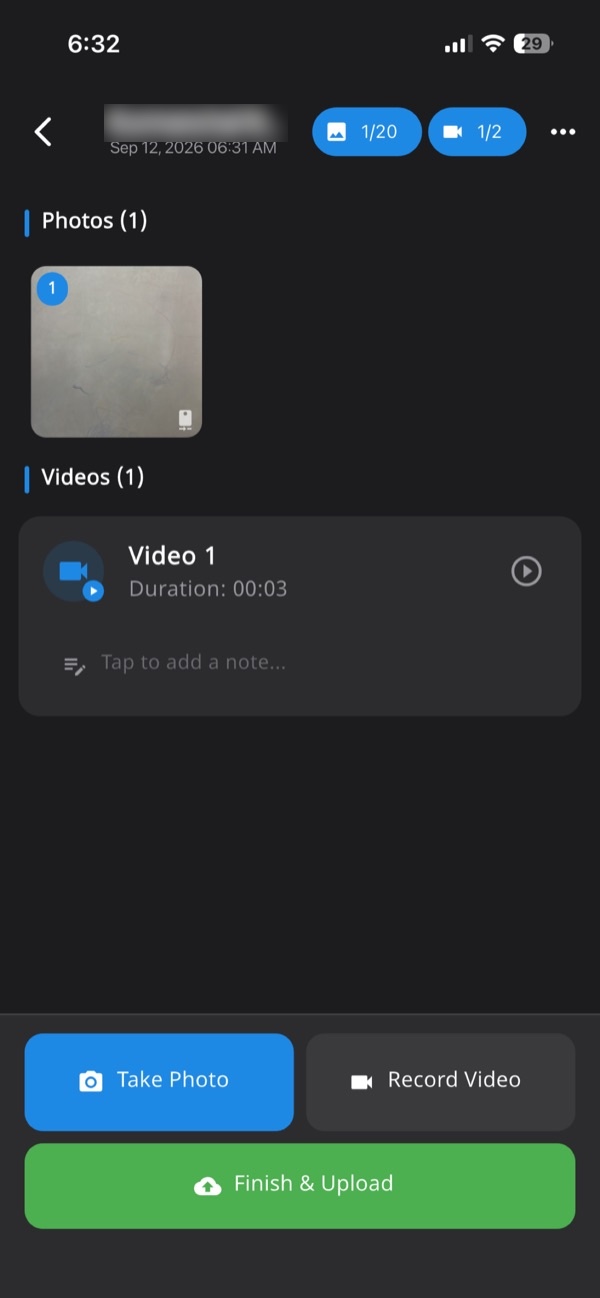
- Open the app and start a job record for the site. Every photo, video and note lands in this one session, numbered and tied to the site.
- Take the before photo with the app's own camera. There is no gallery or file picker, so only live photos go in.
- Check that the location and time are burned into the photo at the shutter.
- Work with no signal if you need to. Capture continues offline and uploads when the phone is back online.
- At each stage, take the wide and close shots from the same spot, and add a short note.
- Do the official upload in the scheme's own app, as the guideline requires.
- Before leaving the site, make the one-tap PDF report. It carries your customer's logo, the location, device and time, and a QR code.
- Send the report. Your client or reviewer can scan the QR to open a public check page, with no account and no app.
Anyone can also drop the PDF they received onto that page. A match means the file is untouched. Nothing is uploaded, because the fingerprint is made in the browser. See how to check a Verafii report and scan the QR, drop in the file.
If a fake location was used, Verafii flags it on the photo, the report, the verify page and the dashboard, on Android and iPhone. A flag is a reason to ask, not proof of fault.
Keeping it organised across a team
A single contractor with ten sites soon has thousands of photos. Order matters more than volume.
- One job record per site, named the way the department names it.
- One stage per set of photos, so a reviewer finds plinth photos in one place.
- Managers on the web dashboard, where they can review the work and export what they need.
- Reports made on site, not weeks later from memory.
Some teams also need attendance, geofenced sites or live tracking between clock-in and clock-out. Those are add-ons available on request, charged on top of the plan. See our post on catching fake GPS fairly before you use any of it on a crew.
What your own record can't replace
A private record has limits, and you should be clear about them.
- It is not the official upload. If the scheme needs a photo in its app, your own copy does not count in its place.
- Acceptance is the department's decision. Whether a department, DISCOM, auditor or court accepts a report is for them to say.
- It shows a photo, not the quality. A photo proves a place and a time. It cannot prove the concrete grade or the wiring behind a wall.
- GPS can be off. Indoor and tall-building drift is normal, so ask before you accuse anyone.
- It does not guarantee payment. It only helps you show what was done.
Verafii's report states what the photos and the device recorded. The reader draws the conclusion.
Checklist before you start a public work
- Read the scheme's current guideline and note the stages and the app.
- Confirm who in your team holds the official app login.
- List the stages that will be hidden later, and plan photos before they are covered.
- Fix one viewpoint per stage and mark it on site.
- Put a board or site number in each wide shot.
- Take photos live, with location and time on the image.
- Add a one-line note to each stage.
- Make the report before leaving the site.
- Do the official upload on the same day.
- Keep the report and its QR for the full period the department can ask.
Frequently asked questions
What is a geo tagged photo for government work?
It is a photo that carries its location, date and time. Schemes use it as evidence that work exists at a place and stage. The Awaas App store page describes this for house construction. Check each scheme's guideline for what it needs.
Do PMAY-G payments depend on geo-tagged photos?
The Ministry of Rural Development says that [instalments depend on a construction stage being completed and a geo-tagged, time and date stamped photo uploaded on AwaasSoft through AwaasApp](https://www.pib.gov.in/PressReleseDetailm.aspx?PRID=2151276®=48&lang=2). Read the current scheme guidelines for the exact stages.
Can I use Verafii instead of the official government app?
No. Verafii does not upload to any government portal and does not replace an official app. Use the official app where the scheme requires it. Keep a Verafii report as your own record beside it.
Does WhatsApp remove location from photos?
Chat apps commonly strip location data from photos they send, so a forwarded picture often arrives without it. That is one reason a reviewer may question it. A photo with location and time burned into the image keeps them visible.
How can a client check a Verafii report?
They scan the QR in the report to open a public check page, with no account and no app. They can also drop in the file they received. A match means the file is untouched, and the fingerprint is made in the browser, so nothing is uploaded.
Will Verafii make sure my photos are accepted?
No. Whether a department, DISCOM, client or auditor accepts a photo is their decision. Verafii shows what the photos and report contain: location, time, device and a fingerprint. Follow the scheme's own rules for the official upload.
What happens if I have no signal on site?
Verafii captures offline and uploads when the phone is back online. The location and time are still burned in at capture. Do the official upload as the scheme's app allows.
Try it on one public work site
Start the 30-day free trial and keep a checkable record on one site, with a call at the end to decide whether to continue. Or ask for a quote: the price depends on your team, meaning field agents, admin users, how long evidence is kept, and photo and video quality. This article is general information, not legal advice.
