
A daily progress report (DPR) is a one-page record of what happened on site today. Use a fixed daily progress report format for construction: header, manpower, work done, materials, issues, tomorrow's plan, and a small set of dated photos. Fill it before you leave site and send it the same day. This post is for site engineers and supervisors. It gives you a text template, the photo set, and a way to send the DPR so the client can check it.
What is a daily progress report (DPR) for?
A DPR tells the client, the project management consultancy (PMC) and your own office what moved today. It also protects you. When a delay, a dispute or a running bill (RA bill) question comes up weeks later, the DPR is the day-by-day record.
A good DPR answers four questions: who worked, what was done, what stopped work, and what happens next. If a reader has to phone the site to understand it, the format is too loose.
There is no single national DPR form. Your contract, client or PMC may prescribe one. If they do, use theirs and add the photo set below.
The daily progress report format: fields to fill
Keep the format short enough to finish in ten minutes. Copy this list into a document or sheet and use it every day.
- Header: project name, site or package, date, weather, report number, prepared by.
- Manpower: skilled and unskilled workers by trade, subcontractor gangs, supervisors present.
- Equipment: machines on site, working or idle, hours used.
- Work done today: activity, location (block, floor, chainage or grid), quantity done, unit.
- Cumulative progress: quantity done to date against the plan, as a percentage of the item.
- Materials: received today, consumed, balance, and any test or inspection done.
- Hold-ups: what stopped work, for how long, and who must act (drawing, payment, material, permit, rain).
- Safety: incidents, near misses, toolbox talk held.
- Tomorrow's plan: activities, manpower needed, materials to be ready.
- Photos: the set for the day, numbered, each tied to an activity line.
- Sign-off: engineer's name, and client or PMC remarks if they review it.
A table works well for the work lines:
| Activity | Location | Quantity today | Cumulative | Remarks |
|---|---|---|---|---|
| Brick masonry | Block B, 2nd floor | 38 sq m | 62 percent | Mortar mix checked |
Verdict: use the same fields every day, so any two reports can be compared side by side.
Which photos should a DPR include?
Three to ten photos a day is usually enough. More photos rarely help; clearer ones do. Tie each photo to a line in the report.
- Wide site view: one frame from the same fixed spot each day, so progress is visible over time.
- Each active work front: a wide shot, then a close shot of the finished part.
- Before and after: where work covers earlier work, such as rebar before concrete or a pit before backfill.
- Material received: the delivery, with the label or batch visible.
- Hold-ups: the blocked area, the missing item or the water on the working surface.
- Safety: barricades, edge protection, signboards, where they matter.
Put a measuring tape, a marked board or a known object in frame when size matters. For stage-wise photo standards on handover, see our work completion report format. For billing, see the running bill photo routine.
One session per site, every day
The most common DPR problem is mixing. Photos from two sites land in one chat, or yesterday's photos are attached to today's report.
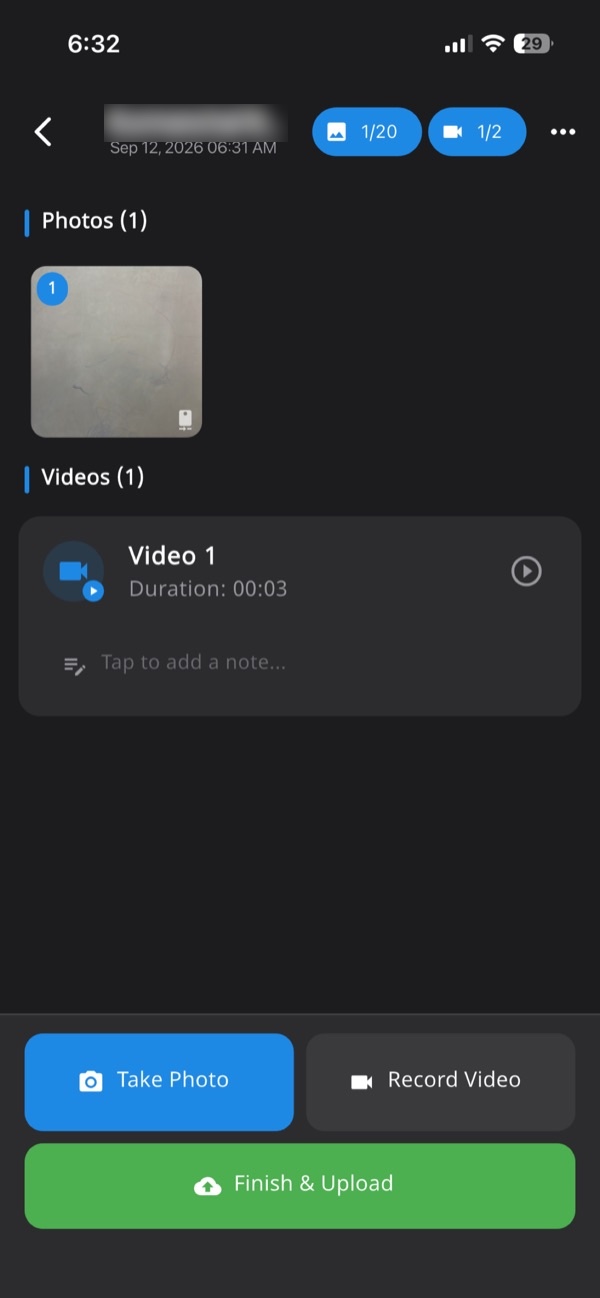
Keep one record per site per day. Everything captured that day goes into it, in order: photos, video, notes. Name the record by site and date.
In Verafii, every photo, video and note lands in one session, numbered and tied to the site. That is the job record. A supervisor with two sites opens two sessions and the photos do not cross.
This also helps the office. When the client asks about 14 October at Block C, you open one record, not five chat groups. Our post on why WhatsApp isn't enough for progress photos explains what goes missing in chat.
How to do it with Verafii
Verafii is a camera and report app. It does not replace your DPR template. It supplies the dated, located photos and the PDF around them.
- Open the session for today's site, or start a new one.
- Take each photo and video with Verafii's own camera. There is no gallery, so only live captures can be added.
- Check that the GPS and time are stamped on each image at the shutter.
- Add a short note to each item: activity, location, quantity. No signal is not a problem, because capture works offline and uploads when the phone is back online.
- Before leaving site, make the one-tap PDF report. It carries your client's logo, the location, device, time and a QR code.
- Send the PDF to the client and your office, with your DPR fields in the message or attached.
The check anyone can run: scan the QR, or drop the file onto the verification page, and a match shows the report is untouched. See the construction site photo report page for what a report holds.
Using the app in your language
Your crew may not all work in English. The app and the web dashboard come in 11 languages, including Hindi, Marathi, Tamil, Telugu, Bengali, Gujarati and Kannada. A supervisor can capture and add notes in the language they are comfortable with.
Be clear on one point: the PDF reports and the photo watermarks are in English. A client reading the report sees English text, even when the app was used in another language. If your client needs a Hindi or other-language DPR, you will have to prepare that separately.
Managers can use the web dashboard and exports to see the day's records across sites.
What a DPR can't show
A DPR is a record of the day, not proof of everything.
- Quantity: a photo shows condition, not measurement. Quantities must come from measurement, in your measurement book or a joint measurement.
- Quality: a photo cannot show concrete strength or compaction. Test results do that.
- Hidden work: what is covered is visible only if you photographed it before covering.
- Accuracy of GPS: GPS can drift indoors and near tall buildings, so ask before you doubt a location.
- Acceptance: whether a client, PMC or department accepts a photo or report is their decision.
Verafii flags a photo taken with a fake location, on Android and iPhone. That is a flag for a human to look at. It is not a verdict on the person. Our post on catching fake GPS fairly covers how to handle one.
Frequently asked questions
What should a daily progress report include for a construction site?
Include the date and site, manpower, equipment, work done with quantities, materials, hold-ups, safety, tomorrow's plan and a numbered photo set. If your contract prescribes a form, use it and add the photos.
How many photos should a DPR have?
Three to ten dated photos is usually enough: one fixed wide view, each active work front, any covered work, deliveries and hold-ups. Tie each photo to a line in the report so a reader knows what it supports.
Can I send a DPR on WhatsApp?
You can, but chat apps often strip location and time, and a reviewer cannot tell whether a photo is from today. A PDF made from live captures, with a QR anyone can scan, is easier to check.
Are Verafii reports available in Hindi?
No. The app and dashboard come in 11 languages, including Hindi, Marathi, Tamil, Telugu, Bengali, Gujarati and Kannada. The PDF reports and the photo watermarks are in English.
How does a client check a Verafii DPR?
They scan the QR in the report, which opens a public page with no account or app needed. They can also drop in the file they received. The file is fingerprinted in their browser, nothing is uploaded, and a match means it is untouched.
Will Verafii make sure my DPR is accepted?
No. Whether a client, PMC or department accepts a DPR is their decision. Verafii gives them live-captured photos with GPS and time, and a report they can verify.
Try it on one site for 30 days
Run your DPR photos through Verafii on one site and see the one-tap report for yourself. Start the 30-day free trial, or ask for a quote. The price depends on your team: field agents, admin users, how long evidence is kept, and photo and video quality.
